
Did you know you can be tricked into installing malware on your own device? Scammers are becoming more bold and opportunistic, using aspects of online life we’re all used to, like CAPTCHA confirmations, to con victims into manually adjusting their own PCs or Macs.
Learn more about the ClickFix scam below and how to avoid it.
Scam Detectors Most Trusted Websites in Online Security
- Guard.io (100): Protect your digital world on any device – Guardio stops scams and phishing in their tracks.
- Incogni.com (100): Delete your personal data from the internet and protect against scams and identity theft.
- ExpressVPN (100) Stay secure and anonymous online - Best VPN Out There
How the ClickFix Scam Works
Some websites are created by scammers purely for the purpose of installing malware. This malware steals personal data or creates backdoors for other malware to access the machine.
ClickFix scams can also be built on existing websites, where scammers have accessed a site and altered its access requirements.
These access requirements look like this:
- An online user clicks onto a website, often from an ad on social media or Reddit.
- The website looks genuine, but says it needs the user to perform a security check, similar to a CAPTCHA.
- The CAPTCHA-style check then instructs the user to open the Windows Run dialog, Command Prompt, PowerShell, or the Terminal app on a Mac.
- The user is then prompted to type in a specific string of characters, which seems random, just like a CAPTCHA.
Once the user presses “Enter,” that string of characters installs malware onto the computer. This malware may steal sensitive information, login details for accounts, or even try to access crypto wallets.
Avoiding the ClickFix Scam
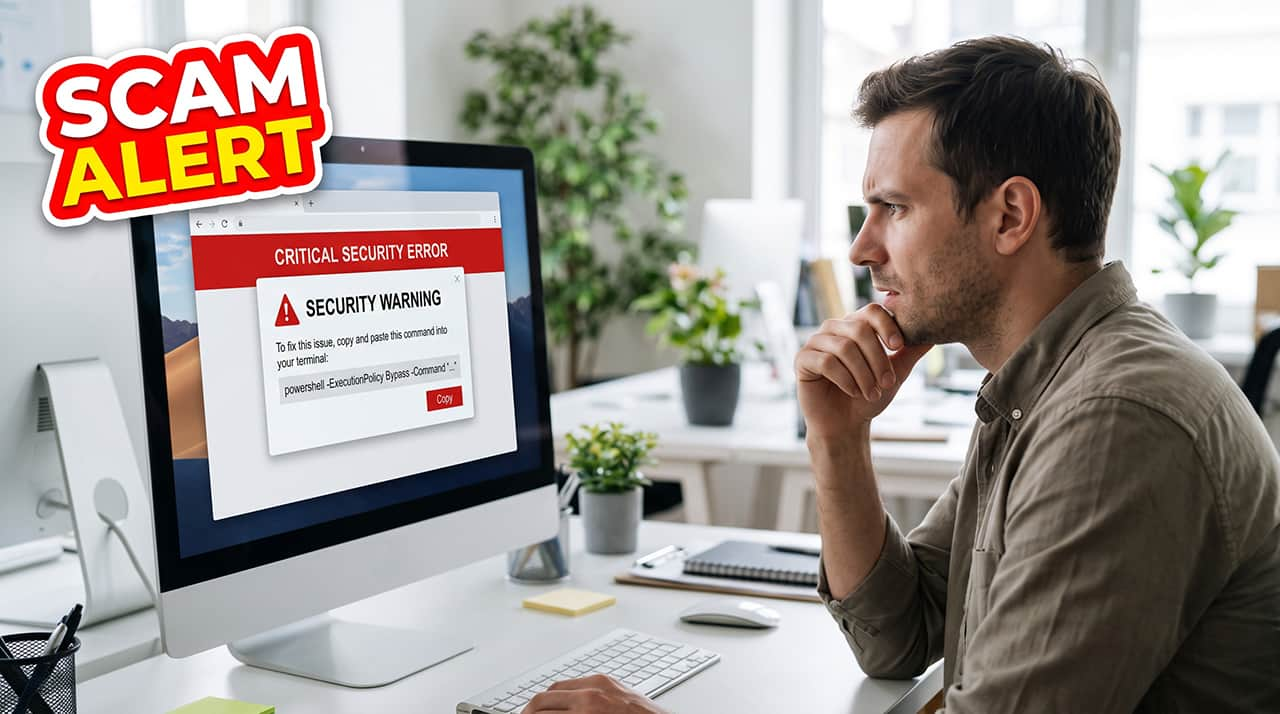
No genuine website will ever ask you to run a command prompt or terminal entry. If you receive a request like this, immediately navigate away from the site and close any windows that opened.
Some antivirus software apps will prompt you when you are visiting a site that seems unsafe. However, some can appear very real indeed. In September 2026, attackers compromised HBO Max's verified Reddit advertising account and used it to post malicious ads linking to ClickFix scam websites.
In response, Reddit paused the account and removed the ads, but not before people were already clicking on the links. If you think you may have clicked a suspicious link or you know you’ve entered something into your Run or Terminal app, follow these steps:
- Run a full scan using your antivirus or Defender software.
- Check your installed apps to make sure there’s nothing you don’t recognize in there.
- After verifying what they are, uninstall or delete files or applications that shouldn’t be there.
- Check your browser windows and close anything that is still open after clicking a suspicious link.
- Consider installing malware-specific protection software, always checking user reviews before you do so.
Online scams are becoming more sophisticated, but you can stay safe by making sure you never enter anything into your Run, Terminal, or command prompt apps that’s provided to you by a website.
Learn more about staying safer online by signing up for Scam Alerts from Scam Detector. You’ll receive regular updates on crimes just like the ClickFix scam to help you stay informed and secure.
Verify Another website
Are you just about to make a purchase online? See if the website is legit with our validator:
vldtr®

TOP MUST-WATCH FRAUD PREVENTION VIDEOS
1. Top 5 Amazon Scams in 2024 2. Top 5 PayPal Scams in 2024 3. How to spot a scam Email in 2024
When my sweet old grandmother got caught up in an Amazon gift card scam, I decided then and there that I needed to do whatever I could to inform as many people as possible about the grifters of the world. That’s what I do here – writing about modern scams so you don’t get caught out.
- Latest Posts by Tom Watton
-
Beware of Fake Passkey Setup Requests
- -
How to Spot and Avoid Homoglyph Attacks
- -
Add Me to WhatsApp Robocall Scammers on the Rise
- All Posts